We've repositioned from website tech care to AI consulting for new and small
businesses — email-first, async, no calls unless paid and scoped. Grab the free
AI Starter Kit, or start with a $99 AI Readiness Audit.
Additional-address setup in Proton Mail for a real sender identity.Custom-domain alias management in Proton Pass for privacy aliases on your own domain.
Need a throwaway sign-up address?
Use hide-my-email. It is the easiest alias to disable later without touching your real inbox address.
Need a real second address you can send from?
Use an additional address in Proton Mail, not a disposable alias.
Need quick sorting with zero setup?
Use a +alias. It is fast, but it is not the same thing as a kill-switch alias.
Start by choosing the kind of alias you actually need
Most shorter Proton alias guides go sideways because they answer the word alias without answering the job. Proton does not treat these tools as interchangeable, and you should not either.
The easiest way to set up the wrong thing: if you want a throwaway sign-up alias and you create an additional address, you made a long-term mailbox identity instead of a disposable privacy layer. If you want a real second sender address and you reach for a +alias, you will hit the opposite problem.
Alias type
Best for
Setup path
Main limitation
Additional address
A real second address you can send and receive from every day.
Settings → Identity and addresses → My addresses → Add address
Counts against plan limits and is not meant to be disposable.
+alias
Quick filters, tracing where an email came from, and light organization.
Plain-English shortcut: hide-my-email protects your real address from untrusted sites. Additional addresses give you another real address. +aliases help you sort mail. Pass custom domains give you disposable aliases on a domain you control.
If you only need a disposable alias, start with hide-my-email inside Proton Mail
This is the simplest answer for most people. If your goal is privacy, not a second long-term mailbox identity, hide-my-email is the best first stop.
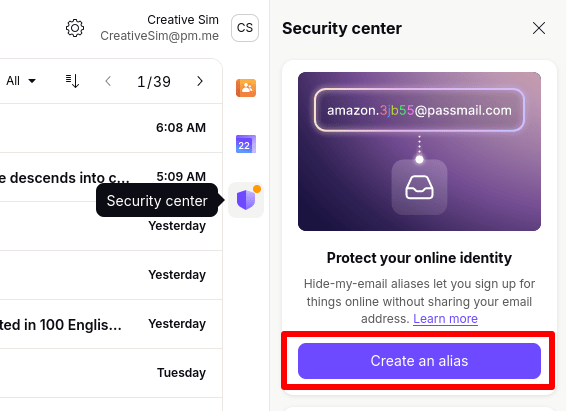
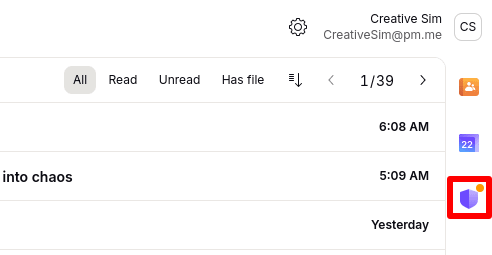
Proton now exposes this directly inside the Proton Mail web app, so you do not have to begin in SimpleLogin or hunt through Pass first. Open Proton Mail on the web, click the Security center icon in the right side panel, and then click Create an alias.
Official Proton support screenshot showing where the Security center lives inside Proton Mail.Official Proton support screenshot showing the hide-my-email creation flow in Proton Mail.
Open mail.proton.me and sign in.
Click the Security center icon in the right side panel.
Click Create an alias.
Add a Title and optional Note.
Click Create and copy alias.
If you need the full list later, click All aliases. Proton says that opens Proton Pass for broader alias management.
Use this for: newsletters, shopping accounts, beta-app signups, temporary vendor logins, and any site you may want to silence later without changing your main mailbox identity.
There is one wrinkle worth knowing up front. Proton notes that if your account uses an extra password for Proton Pass, alias management happens directly in Pass rather than inside the simple Mail side panel flow.
If you need a real second address you can send from, add an address in Proton Mail
An additional address is what most people mean when they say, "I want a second email address on this account." It is a real mailbox identity, not just a forwarding alias. Think [email protected] or [email protected].
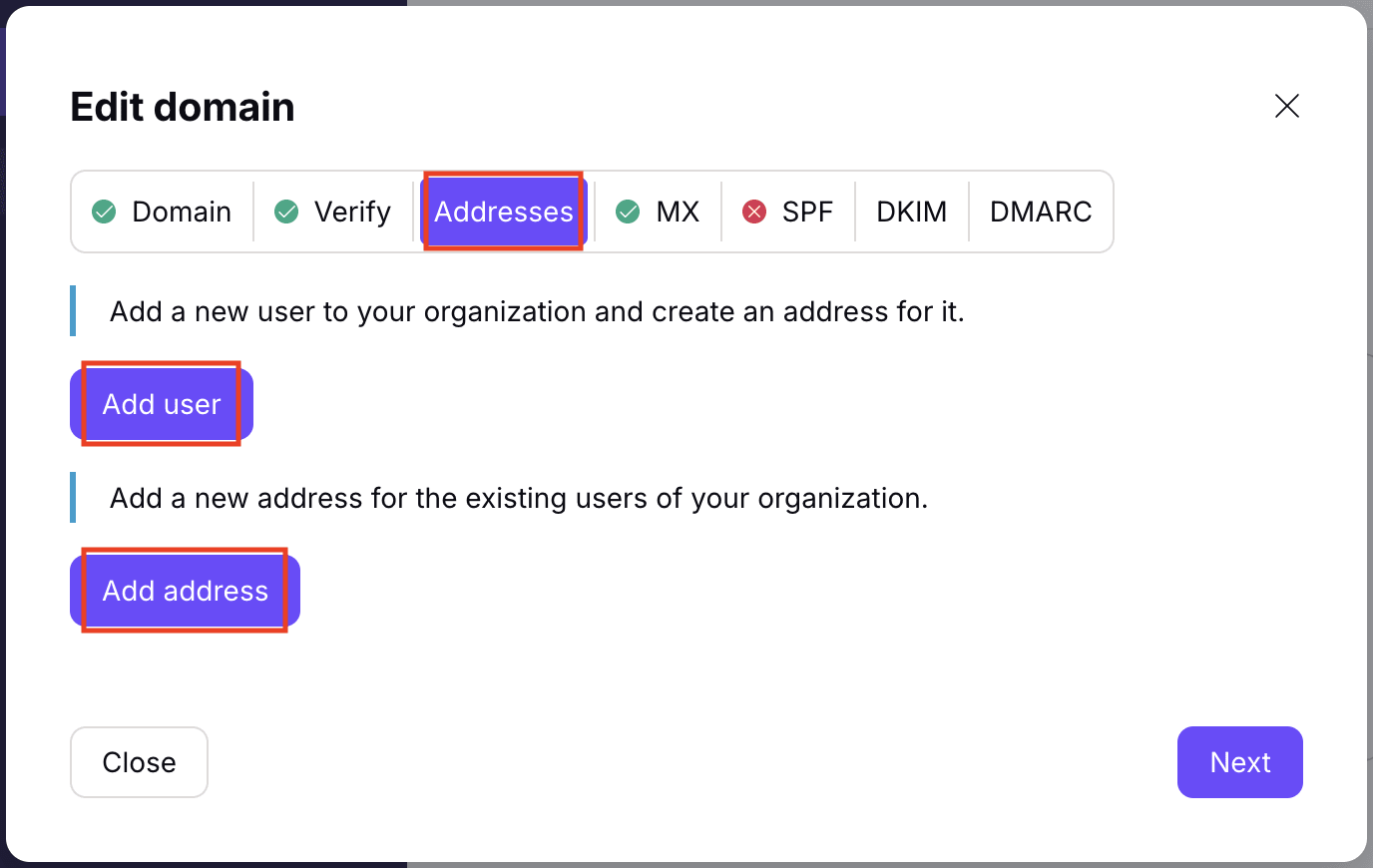
In Proton Mail, open Settings, then go to Identity and addresses, then My addresses, and click Add address. From there, choose a Proton domain or one of your custom domains and save the new address. If you want to use it as your default sender later, Proton says you can make it default from the same screen.
Official Proton support screenshot showing the add-user and add-address step for custom-domain addresses in Proton Mail.
Use an additional address when
You want a real second sender identity, a work/personal split, or a branded address on your own domain.
Do not use it like a disposable alias
It is a mailbox identity with plan limits, default-sender behavior, and stronger deletion restrictions than hide-my-email.
Important distinction: Proton support says disabled Proton-domain additional addresses still count toward your additional-address limit. It also limits deletion of Proton-domain addresses, so do not create one casually just to isolate one newsletter.
If you are on a Family or Duo-style shared plan, Proton also notes that the plan administrator controls additional-address creation for members. That is another reason this behaves more like mailbox setup than throwaway aliasing.
If you just want quick filtering, a +alias is still useful
Plus aliases are the lightest option because there is no setup page at all. You simply use a variation of your existing address, such as [email protected], and Proton routes it into the same mailbox.
This is a good move when you want filters, source tracking, or a quick clue about where an address leaked from. It is the wrong move if your real goal is to shut one alias off later.
Where +aliases help
Sorting, rule-building, debugging signups, and telling one source from another without managing a list of created aliases.
Where +aliases fall short
Some forms reject the plus sign, there is no one-click disable for one tag, and you cannot start a brand-new message from a fresh +alias. Proton says you can reply from it after mail arrives there.
If you only need lightweight organization, this is still worth using. Just do not confuse it with a privacy alias.
If you want your own domain involved, decide whether you need a real address or a disposable alias
Custom domains are where people get turned around fastest, because Proton supports two different ideas that both involve your domain name.
Proton Mail custom domain addresses
Use this when you want full mailbox identities like [email protected] that behave like real addresses you can send from in normal Mail workflows.
Proton Pass custom alias domains
Use this when you want disposable or semi-disposable aliases on your own domain, with the privacy and control style of hide-my-email aliases.
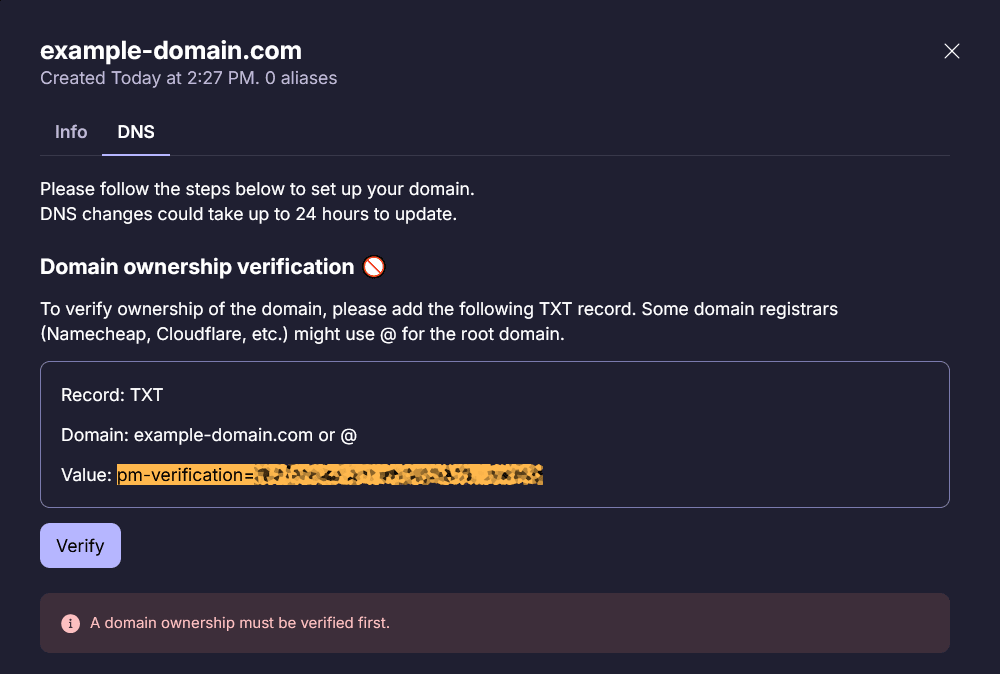
Official Proton support screenshot showing custom-domain alias management in Proton Pass.
For the Pass route, Proton's documented path is Settings → Aliases → Add custom domain, then domain verification and DNS setup. Proton says this is available on plan tiers that include custom alias domains, such as Pass Plus and Proton bundles that include advanced Pass features.
If you keep reading SimpleLogin docs, that is not a contradiction. It is the same advanced alias layer exposed more directly. Most people do not need to start there unless they want multi-mailbox forwarding, reverse-alias sending to new contacts, or more technical control from day one.
Plan limits matter more than older alias guides make it sound
Alias advice gets stale fast because limits change and old articles keep circulating. For this guide, the current public Proton pricing pages on March 24, 2026 are the numbers that matter.
Free
Good for testing the service and basic mailbox use.
1 email address
+aliases still work
Hide-my-email is capped at 10 on Proton's current public pricing pages
Mail Plus
The first tier where extra Mail identities become practical.
10 extra email addresses
1 custom email domain
10 hide-my-email aliases
Proton Unlimited
Better fit if you want more Mail identities plus advanced Pass aliasing.
15 extra email addresses
3 custom email domains
Unlimited hide-my-email aliases
Proton Duo
Higher shared-account ceiling, with admin control on address creation.
30 extra email addresses
3 custom email domains
Unlimited hide-my-email aliases
Best way to read that table: if you need real sender identities, look at extra email addresses and custom domains. If you need privacy aliases, look at hide-my-email limits and Pass features. Those are separate budgets.
The mistakes that waste the most time
Using an additional address for a risky signup
You created a mailbox identity when all you wanted was something easy to disable later.
Assuming every alias type is unlimited
+aliases are effectively unlimited. Hide-my-email aliases are not, unless your plan tier says they are.
Treating +aliases like a privacy wall
Your real address still sits behind the same mailbox identity, and some sites strip the plus tag anyway.
Mixing up Mail custom domains with Pass custom alias domains
One gives you real addresses on your domain. The other gives you privacy aliases on your domain. Pick the one that matches the outcome.
FAQ
Are Proton Mail aliases free?
Some are. +aliases do not require a special setup screen, and free accounts can use basic alias-like features. But extra Mail addresses, broader alias limits, and custom-domain alias controls depend on plan tier. Check Proton's current pricing pages before assuming an older guide still matches the limits.
Can I send email from a Proton alias?
It depends on the alias type. Additional addresses are real sender identities, so yes. A +alias can be used when replying after mail arrives there, but Proton says you cannot start a fresh message from a brand-new +alias. Hide-my-email aliases are not the same thing as a normal sender identity.
What is the difference between an additional address and a hide-my-email alias?
An additional address is a real address on your Proton account or custom domain. A hide-my-email alias is a privacy buffer for signups and forwarding. One is for stable identity. The other is for separation and shutoff control.
Should I use Proton Mail custom domains or Proton Pass custom alias domains?
Use Proton Mail custom domains if you want full addresses on your domain, such as [email protected]. Use Proton Pass custom alias domains if you want disposable or privacy-focused aliases on your domain.
Is @pm.me the same thing as an alias?
Not really. Proton treats @pm.me as a short-form address tied to your account, not as a separate category of privacy alias. Proton's support pages say newly activating it now requires a paid plan.
Do I need SimpleLogin directly?
Usually no. Most people can stay inside Proton Mail or Proton Pass. SimpleLogin matters when you want the more advanced alias layer directly, such as multi-mailbox forwarding or reverse-alias sending for new contacts.
Sources
The article and screenshots above were built from current official Proton and SimpleLogin sources reviewed on March 24, 2026.
Need help with custom-domain mail, forwarding, or inbox cleanup?
If you are setting this up for a business and the alias, domain, and mailbox pieces are starting to blur together, I can help turn that into a cleaner setup plan.